FEATURED STORY OF THE WEEK
H200 Deployment Tools: Building Robust AI Infrastructures with NVIDIA’s Tools & Best Practices

Deploying NVIDIA H200 GPUs in production—whether for large‑language model (LLM) training, generative AI, or high‑performance computing (HPC)—demands more than just high‑spec hardware. It requires a suite of deployment tools, orchestration frameworks, and validation methodologies that ensure you can scale reliably, maintain performance, and optimize your infrastructure investment.
This article dives deep into H200 deployment tools: what you need, best practices, trade‑offs, and how Semifly helps enterprises deploy with confidence.
1. Why Deployment Tools Matter for NVIDIA H200
The H200’s power comes from its large HBM3e memory (141 GB), high interconnect bandwidth, NVLink, NVSwitch fabric, and upgraded networking. These features enable massive throughput—but they also introduce complexity.
Here are the deployment challenges:
- Ensuring hardware topology (NVLink, NVSwitch) is configured correctly to avoid performance bottlenecks.
- Validating networking and RDMA behavior so that GPU‑to‑GPU communication isn’t throttled by misconfiguration.
- Achieving software tool compatibility (drivers, container runtimes, Kubernetes operators).
- Scaling across nodes reliably—making sure NCCL collectives, synchronization, and failure handling work at multi‑node scale.Monitoring and diagnosing performance degradation (e.g., thermal throttling, memory bottlenecks, driver/hardware mismatches).
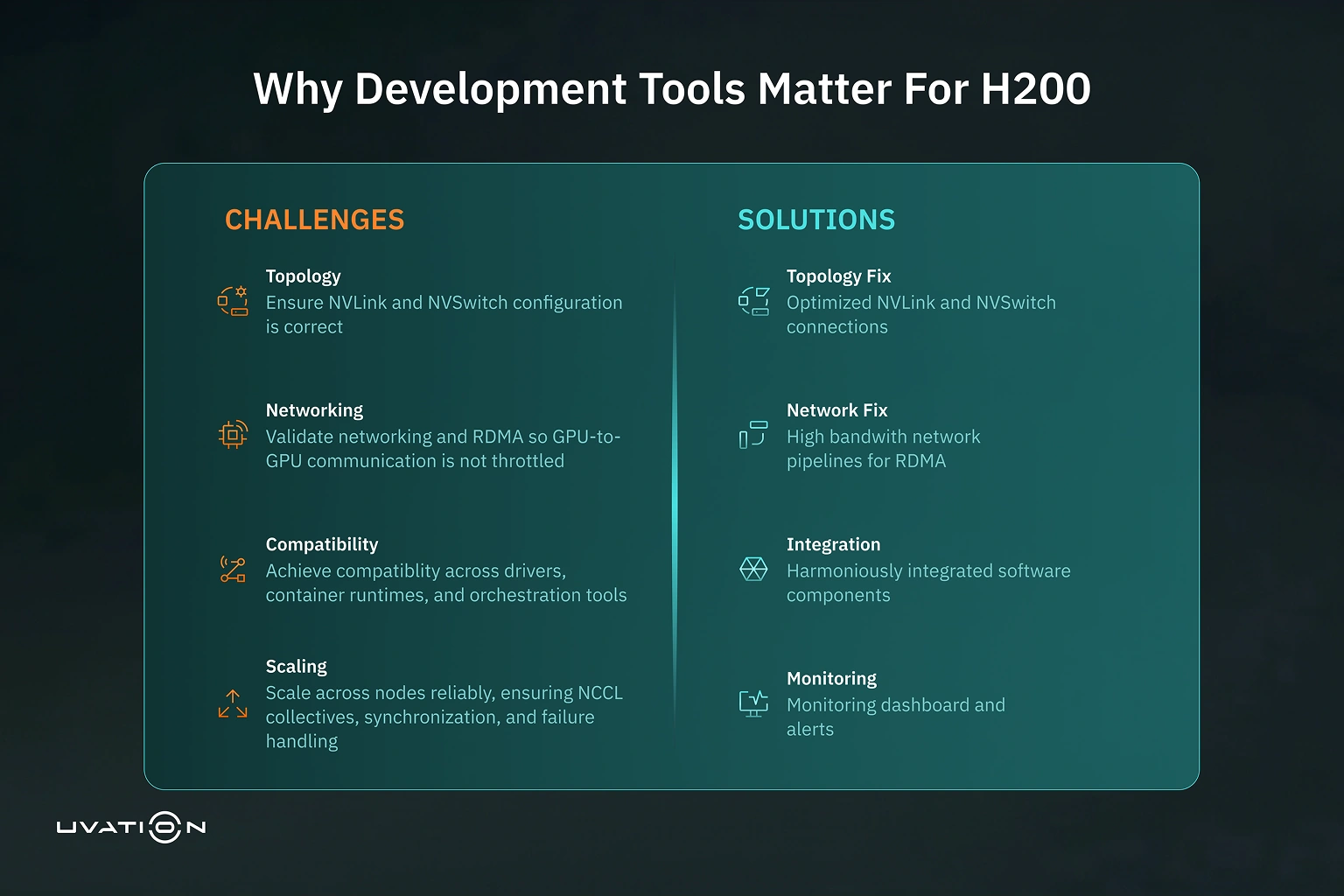
Deployment tools help address all of these, forming a control plane for reliable H200 operations.
2. Core Tools & Frameworks for H200 Deployment
Here are the key categories of tools that are essential in any serious H200 deployment, with examples and what to watch out for:
| Tool Category | What It Does | Key Examples / Notes |
|---|---|---|
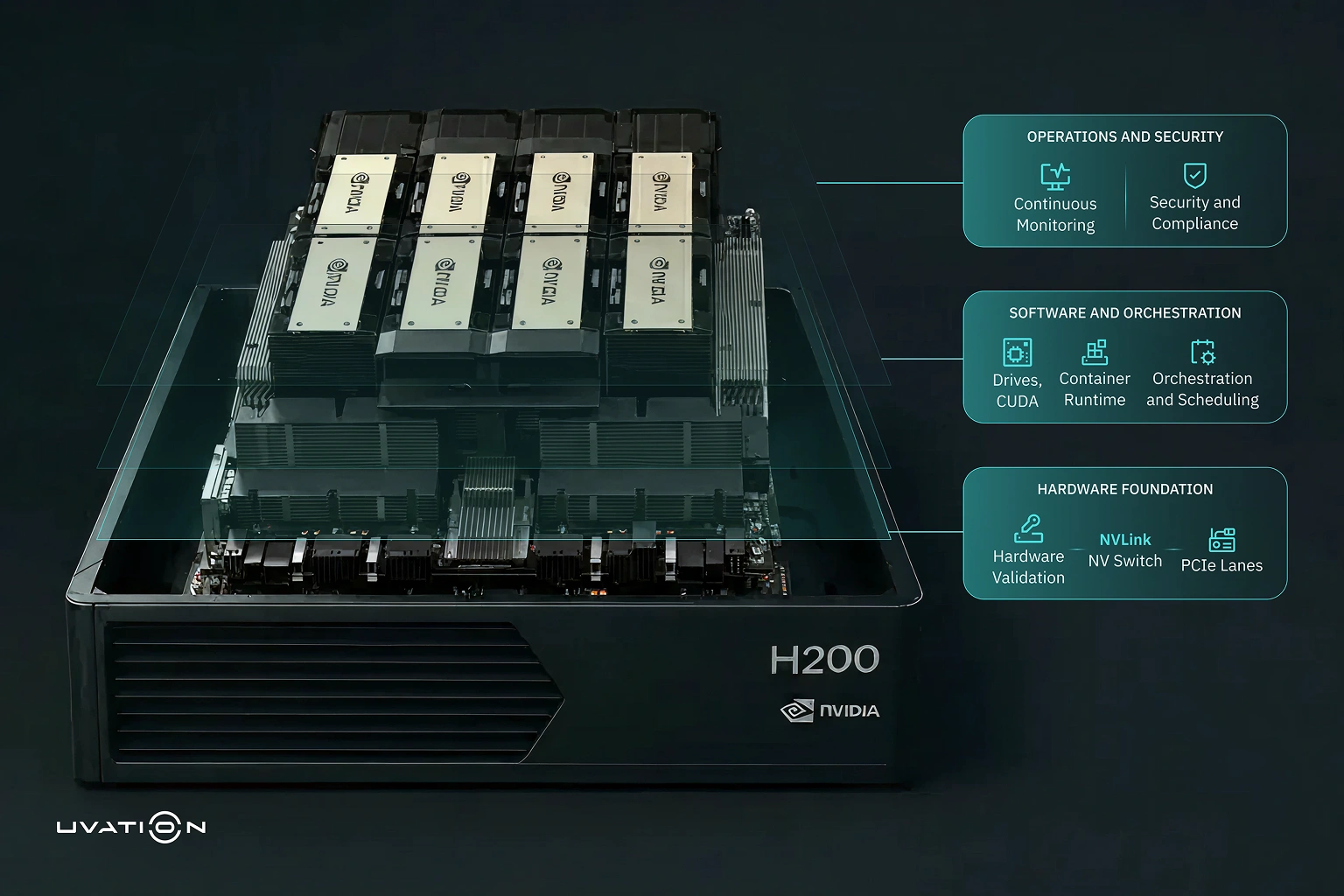
| Hardware Validation & Topology Tools | Validates NVLink / NVSwitch configuration, PCIe lanes, etc., to match vendor specs. | NVIDIA’s own tools (e.g., network tools, system diagnostics), DGX BasePOD guide includes validation steps. NVIDIA Docs |
| Driver & Software Stack Management | Ensures you have correct GPU drivers, CUDA, and compatibility with Linux OS, container runtime, etc. | NVIDIA AI Enterprise provides the driver, virtualization, and Kubernetes operator support. NVIDIA Developer |
| Orchestration & Scheduling | Tools for managing jobs, scaling across nodes, handling failures, distributing workloads. | Kubernetes, Slurm, NVIDIA Base Command (or operator frameworks). Best practice is to integrate NCCL tests. NVIDIA Docs+1 |
| Monitoring, Telemetry & Validation | Continuous monitoring of GPU metrics (utilization, temperature, memory), network latency, etc. | Use of NCCL all-reduce tests, system health checks. NVIDIA’s BasePOD guide includes “Validate GPU / RDMA access”. NVIDIA Docs |
| Reference Architectures & Deployment Guides | Blueprinted designs for how to build complete systems (server, networking, storage, deployment stack). | DGX BasePOD Deployment Guide explicitly for H200/H100 systems. Also “Deploying NVIDIA H200 NVL at Scale with New Enterprise Reference Architecture”. NVIDIA Developer |
| Security & Hardening Tools | Ensure secure deployments, vulnerability management, threat detection, etc. | Semifly’s “Secure by Design: A Cybersecurity Blueprint for H200 Server Deployment”. Semifly |
3. Best Practices for H200 Deployment Tools
Deploying properly isn’t just selecting tools—it’s following best practices so they work together.
- Start with site surveys and hardware compatibility checks (e.g., ensuring NVLink/V‐Switch connectivity, power, cooling requirements). Use vendor‑provided topology verification tools.
- Use staged deployment: test single‑node performance, then small multi‑node clusters, before scaling to full size. Include NCCL collectives in tests.
- Maintain consistent software stack versions across nodes—driver, OS, container runtime, CUDA, NCCL—to avoid mismatches.
- Automate deployment and configuration: use infrastructure‑as‑code (IaC), configuration management (e.g., Ansible, Terraform), Kubernetes operators where applicable.
- Include diagnostic and validation tests: RDMA tests, NCCL‑based all‑reduce tests, latency & throughput benchmarks.
- Monitor continuously: telemetry for thermal, power usage, GPU memory/paging, network latency/jitter. Set up alerting on deviations.
- Plan for failover and redundancy: hardware failures, network outages, node restarts should degrade gracefully, not catastrophically.
4. Reference Architectures & Deployment Guides
Here are specific tools and guides from NVIDIA and the ecosystem you should use when deploying H200:
- DGX BasePOD: Deployment Guide Featuring DGX H200/H100 Systems — NVIDIA’s own guide for hardware, networking, software, including multi‑node NCCL testing. NVIDIA Docs
- Deploying NVIDIA H200 NVL at Scale with New Enterprise Reference Architecture — outlines best server/network configurations and enterprise deployment patterns. NVIDIA Developer
- NVIDIA AI Enterprise Infrastructure Software Collection — includes drivers, Kubernetes operators, and orchestration infrastructure with explicit support for H200 NVL. NVIDIA Developer
5. Table: Deployment Tools vs. Deployment Stages
It helps to map tools to stages of the deployment lifecycle for H200 systems:
| Deployment Stage | Tasks | Tools / Frameworks |
|---|---|---|
| Planning & Design | Topology planning, power/cooling, NVLink/V-Switch layout, network topology | DGX BasePOD guide; reference architecture documents |
| Hardware Validation | Verify GPU health, NVLink connections, PCIe lanes, RDMA functionality | Vendor diagnostics, BasePOD tests |
| Software / Driver Setup | Installing OS, drivers, CUDA, container runtimes, NCCL, MPI | NVIDIA AI Enterprise, driver packages, Kubernetes or Slurm |
| Orchestration & Scheduling | Job scheduling, failure handling, load balancing, synchronization | Kubernetes + operators, Slurm, NVIDIA Base Command or equivalent frameworks |
| Benchmarking & Performance Testing | NCCL collectives, throughput & latency benchmarking | NCCL tools, network / RDMA benchmarking, BasePOD’s cluster-level tests |
| Monitoring & Operations | Telemetry, health, alerting, performance drift detection | Telemetry agents, GPU monitoring tools, dashboards |
| Security & Compliance | Access control, vulnerability patching, threat detection | Security blueprints, hardened OS images, toolchains like NVIDIA Morpheus when available |
6. How Semifly Helps With H200 Deployment Tools
At Semifly, we bring deep experience deploying NVIDIA H200‑based infrastructures. Here’s how we help clients get deployment right:
- We provide blueprint design and hands‑on hardware/software topology validation before deployment begins.
- We select and integrate the right orchestration tools (Kubernetes + operators or Slurm) depending on workload type.
- We run benchmarking and test suites (including NCCL collectives) during deployment to ensure expected performance.
- We build in observability from Day 1—setting up dashboards, telemetry, alerting, and drift detection.
- We implement security best practices: secure boot, device firmware validation, threat detection (leveraged via tools like NVIDIA Morpheus) and the Semifly blueprint.
7. Summary & Call to Action
The NVIDIA H200 GPU is a transformative leap in AI compute, but its full value is unlocked only when paired with the right suite of deployment tools and processes. From hardware validation, driver & software stack alignment, orchestration, monitoring, to security—each tool and framework plays a decisive role.
If you’re planning to deploy H200 at scale and want to ensure you hit performance, reliability and TCO targets without surprises, let Semifly help you map out your deployment architecture, benchmark your cluster, and validate your stack.
Let’s talk about how your infrastructure can scale smarter with H200 and deployment tools done right.
More Similar Insights and Thought leadership
No Similar Insights Found
Subscribe today to receive more valuable knowledge directly into your inbox
We are writing frequenly. Don’t miss that.
Subscribe to get updates

Unregistered User
It seems you are not registered on this platform. Sign up in order to submit a comment.
Sign up now