FEATURED STORY OF THE WEEK
Secure by Design: A Cybersecurity Blueprint for H200 Server Deployment


1. The Stakes Have Changed — And So Should Your Security Playbook
If you’re running H200s in production, you’re not just accelerating inference—you’re holding a digital goldmine. Ransomware gangs, nation-state actors, and rogue insiders are sharpening their tools for you. The average breach? $4.88 million. The real cost? IP theft, downtime, and lawsuits.
The H200 is a beast. It’s meant for generative AI, massive datasets, and multi-tenant environments. But that power is also a magnet for attackers. Poorly configured, this isn’t a server—it’s a liability. But with the right moves, you turn that risk into resilience.
So, how do you harden your H200 deployment? : By embedding security into every step of H200 server deployment .
You do it layer by layer. Think defense in depth. Let’s get into it.
2. Threat Modeling for H200 Server Deployment — Know Thy Enemy
First step: Stop guessing. Start modeling.
You need to think like the enemy—whether it’s an insider with admin access or a nation-state adversary. Begin your H200 server deployment by securing the physical components
A. Where You’re Most Exposed
- Hardware: That PCIe card you just racked? It might be counterfeit. One compromised component can bypass your entire security stack. Always verify your vendors and inspect for tamper-evidence.
- Firmware: The BMC is the skeleton key. If it’s hijacked, attackers can overwrite GPU settings and stay undetected. The H200 enforces firmware signature checks—but only if you turn them on.
- Network: NVLink and InfiniBand are screaming fast. But without TLS or MACsec, they’re open doors. Encrypt everything. Always.
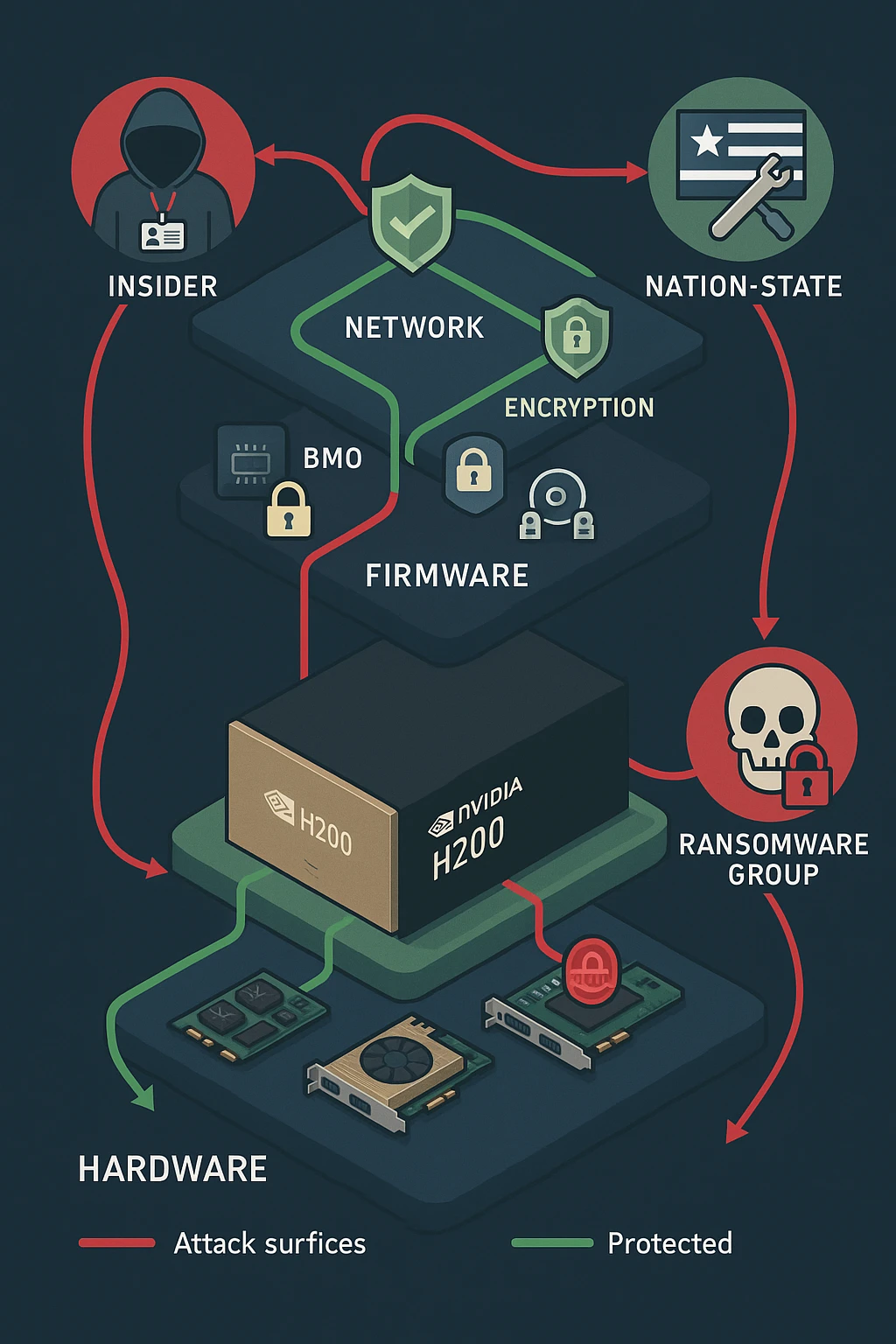
B. Who’s Coming After You
- Insiders: The sysadmin who copied API keys to their desktop. The intern who SSHed from an unsecured laptop. Permissions sprawl is real.
- Nation-States: If you’re training proprietary models, assume someone wants to steal them. Think model theft via side-channel GPU attacks.
- Ransomware Crews: They scan for exposed ports and unpatched firmware like it’s sport. Don’t be low-hanging fruit.
C. H200-Specific Threats
- Multi-Tenant GPU Leaks: One tenant’s LLM training could bleed into another’s inferencing if you’re not using proper namespaces or vGPUs.
- Model Inversion Attacks: Someone bombards your model with queries and reconstructs sensitive training data. Yeah—it’s that real. Use output masking and differential privacy.
3. Pre-Deployment Hardening — Lock It Before You Load It
Deploying H200s without a security baseline is like leaving your vault open during construction.
A. Secure the Hardware First
- Use sealed racks and biometric access.
- Don’t just order GPUs—vet the supplier chain. Counterfeit hardware is a real thing.
- Log serial numbers, check for BIOS integrity, and isolate staging areas.
B. Fortify Firmware Integrity
- Only use NVIDIA-verified firmware—especially for BMCs and NICs.
- Automate signature checks. Enable rollback protection. No unsigned code gets in.
C. Build a Zero-Trust Architecture
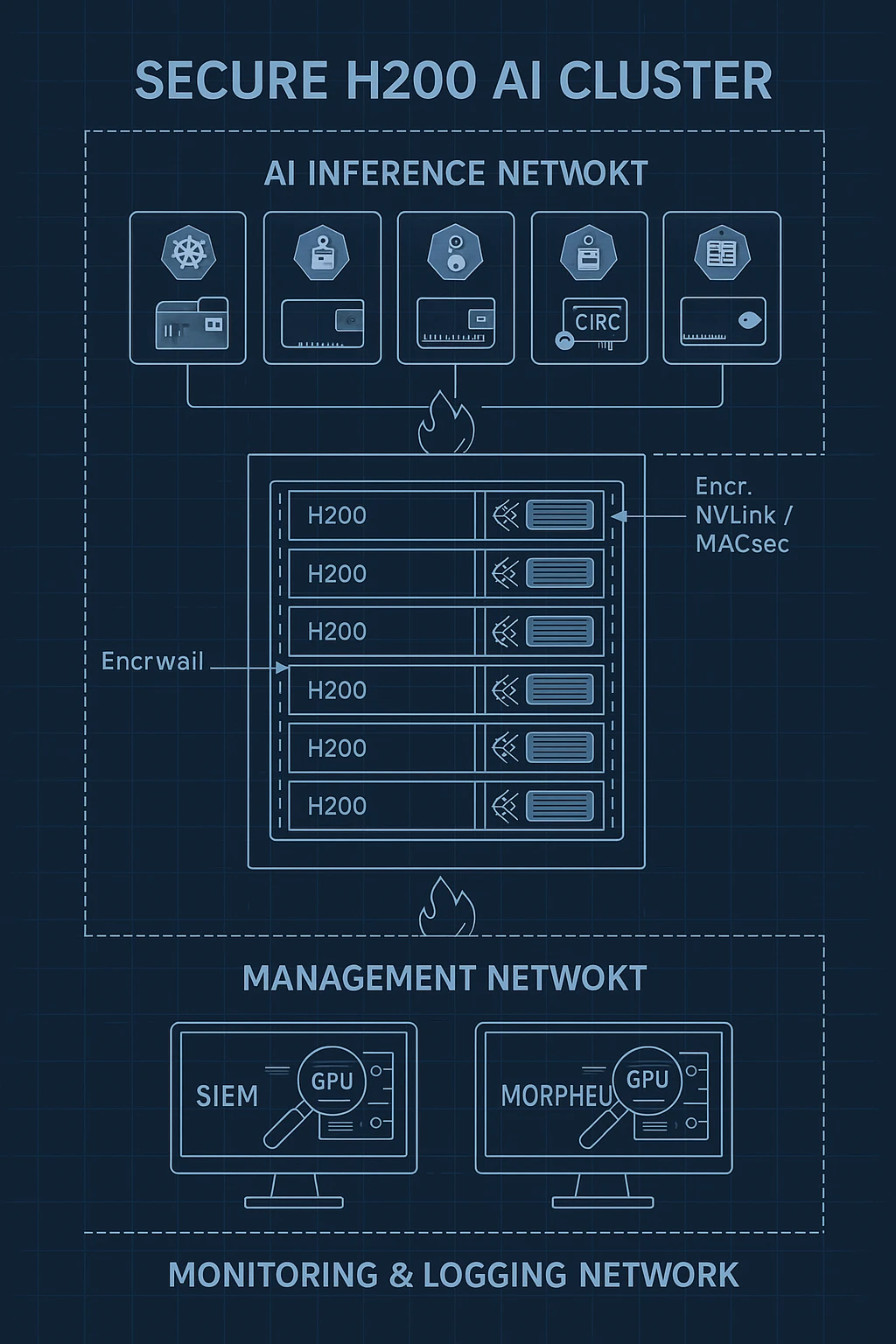
- Separate management networks from AI traffic.
- Encrypt NVLink and InfiniBand connections—even if it “feels unnecessary.”
- Block lateral movement between services. If one container goes rogue, it shouldn’t infect the cluster.
4. Lock Down the Software Stack — The Invisible Attack Surface
Most breaches start with a “Whoops, we forgot to patch that.”
A. Least Privilege, or GTFO
- Don’t give data scientists root access on inference nodes.
- Use vGPU profiles to sandbox users.
- Lock remote login ports. If you’re not using SSH, shut it down.
B. Secure Containers Like Fortresses
- Use NVIDIA’s NGC containers—but scan them with Trivy or Clair.
- Run containers in read-only mode. No mutable state, no surprises.
- Use namespaces to isolate jobs. That LLM training run shouldn’t touch your API inference pipeline.
C. Automate Patch Management
- Use Terraform or Ansible to push updates across your fleet.
- Subscribe to NVIDIA’s CVE alerts. Apply critical patches within 24 hours.
- Audit PyTorch, TensorRT, CUDA—all of it. Vulnerabilities hide in frameworks, not just drivers.
5. Guard the Network and Data — Your Real Crown Jewels
Speed means nothing if your data’s getting siphoned out.
A. Encrypt Everything in Transit
- TLS 1.3 for all APIs.
- MACsec over InfiniBand and NVLink—yes, even internal GPU chatter.
- Monitor for traffic spikes that don’t match GPU utilization. That’s a red flag.
B. Encrypt Data at Rest
- Use self-encrypting drives (SEDs). They comply with HIPAA, GDPR, and won’t slow your workloads.
- Offload AES encryption to the GPU. The H200 supports this natively—it’s like getting free security with no CPU tax.
C. Lock Down Your AI Models
- Enable Confidential Computing via Hopper’s Trusted Execution Module.
- Encrypt the model even while it’s in use.
- Add digital watermarks to your model outputs. If someone leaks it—you’ll know.
6. Enforce Access Control and Monitor Everything
An H200 cluster with weak access controls is like a mansion with the front door wide open. Enforce MFA for every user accessing H200 server deployment tools.
A. MFA Isn’t Optional—It’s the Minimum
- Use MFA everywhere: dashboards, terminals, even DevOps tools.
- Prefer hardware keys over SMS codes. If someone’s targeting you, SIM-swapping is easy.
B. Audit Logging Is Your Time Machine
- Log every API call, GPU usage metric, container event, and data access.
- Use SIEMs like Splunk or ELK Stack to centralize and visualize anomalies.
C. Deploy AI-Powered Threat Detection
- Deploy NVIDIA Morpheus to safeguard your H200 server deployment. NVIDIA Morpheus detects real-time threats like cryptojacking or lateral movement.
- Set triggers for strange usage spikes, failed login storms, or unknown kernel calls.
- Automate response: quarantine nodes, isolate networks, trigger rollback.
7. Governance and Compliance — Do It Once, Prove It Always
You can’t scale GenAI if regulators don’t trust your stack. Align your H200 server deployment with industry standards,
A. Align with Regulatory Standards
- NIST AI RMF, GDPR, HIPAA—check every box.
- Use encryption to satisfy “data protection by design.”
- Run red-team simulations before the auditors show up.
B. Build Security Into DevOps
- Use DevSecOps practices: scan every container, sign every artifact.
- Automate tests in your CI/CD pipeline. Don’t just rely on firewalls.
- Integrate tools like Sigstore and Grype for secure image delivery.
C. Vet Your Partners
- Cloud provider says they’re secure? Ask for SOC 2 or ISO 27001.
- Demand firmware validation, fast patch SLAs, and breach notification clauses.
- If your partner gets hacked—you’re still liable.
Securing your H200 server deployment demands robust encryption and proactive safeguards

8. Prepare for Breaches — Because They may happen, even with the best of the H200 server deployment
Security isn’t about avoiding incidents—it’s about surviving them.
A. Quarantine Fast, Recover Faster
- Use GPU partitioning or Kubernetes tainting to isolate compromised nodes.
- Maintain cold backups of models and training datasets in air-gapped storage.
B. Investigate Like a Forensic Surgeon
- Dump GPU memory and compare to clean-state baselines.
- Use NVIDIA Nsight to trace how the breach unfolded—what they accessed, what they changed.
- Use the data to patch holes and update your threat model.
Final Take: The H200 Is Power—But It’s Also Responsibility
Look, the H200 doesn’t just unlock next-gen AI. It changes the threat landscape. Its processing power, memory bandwidth, and confidential computing aren’t just innovations—they’re attack surfaces.
So you’ve got to treat security as a first-class feature, not a bolt-on. Think beyond “checklist compliance.” Think resilience, trust, competitive edge.
Done right, your H200 cluster won’t just perform—it’ll protect. And in a world where AI wins are short-lived without security, that’s the edge that actually lasts.


More Similar Insights and Thought leadership
No Similar Insights Found
Subscribe today to receive more valuable knowledge directly into your inbox
We are writing frequenly. Don’t miss that.
Subscribe to get updates

Unregistered User
It seems you are not registered on this platform. Sign up in order to submit a comment.
Sign up now